Pose Maker: Post-capture pose edits powered by mobile AI
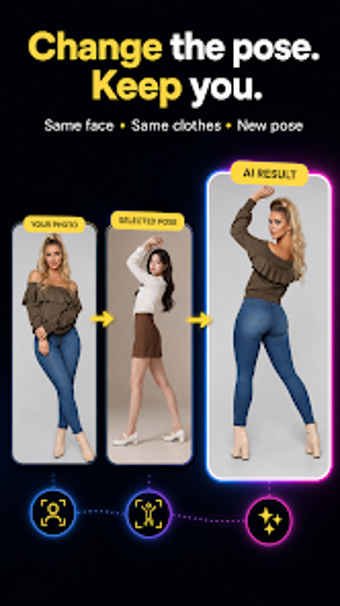
Pose Maker : Pose Change AI, by Roch Apps, is an Android photography tool that lets creators adjust subject posture after capture, solving common "great photo, bad pose" moments. The app applies generative AI to transfer a chosen reference pose onto an existing image while attempting to preserve face and outfit identity. It bundles a pose library, reference-image import, and one-tap generation aimed at social media creators and casual photographers who want quicker, polished images without reshoots.

Unlock your creativity with Adobe Stock
Get 10 images or 1 video with a free trial
What is Pose Maker used for?
Pose Maker is a mobile tool for post-capture pose editing, re-rendering a subject's body into a different posture after a photo is taken. It targets situations where composition and expression are fine but the subject's stance is awkward. The app's core capability is pose transfer, letting users choose a reference pose and instruct the AI to recreate that stance on the original subject while keeping the photo as a base.
What pose sources and outputs does it accept?
The app supports an internal library and external references, so creators can pick or import poses such as standing, sitting, fashion, walking, portrait, and casual social poses. It preserves the original background during rendering and relies on Android hardware for processing, so device capability affects throughput. The tool therefore accepts both built-in presets and user-supplied reference images for direct pose matching.
Is it approachable for creators without editing experience?
The workflow is deliberately simple: choose a pose, add a photo, and generate. One-tap generation automates masking and body repositioning, reducing the need for manual retouching. Identity-preservation technology aims to keep faces and outfits recognizable, which lowers the technical entry point. This design suits creators who prefer fast iterations over assembling multi-layer composites in a desktop editor.
How reliable are edits with complex scenes?
The tool focuses its AI on the subject while keeping background elements intact, and identity preservation helps retain a recognizable appearance. User reports note that outcomes can vary with complex lighting, occlusions, or busy backgrounds, so fidelity depends on the input photo. Because the app re-renders bodies rather than merely warping pixels, creators should consider representation and consent when altering someone’s posture in published images.
Best for fast social feed fixes, not for studio-level compositing
The app is a practical choice for creators who want rapid, mobile-first pose exploration and quick content variation; its automated approach reduces the need to reshoot. Although that convenience trades against the predictability of high-precision compositing in controlled studio workflows, the tool offers a useful way to iterate on visual storytelling for social and casual editorial uses.